The window for adding an EBICS bank uses the information from the EBICS contract provided by the bank.
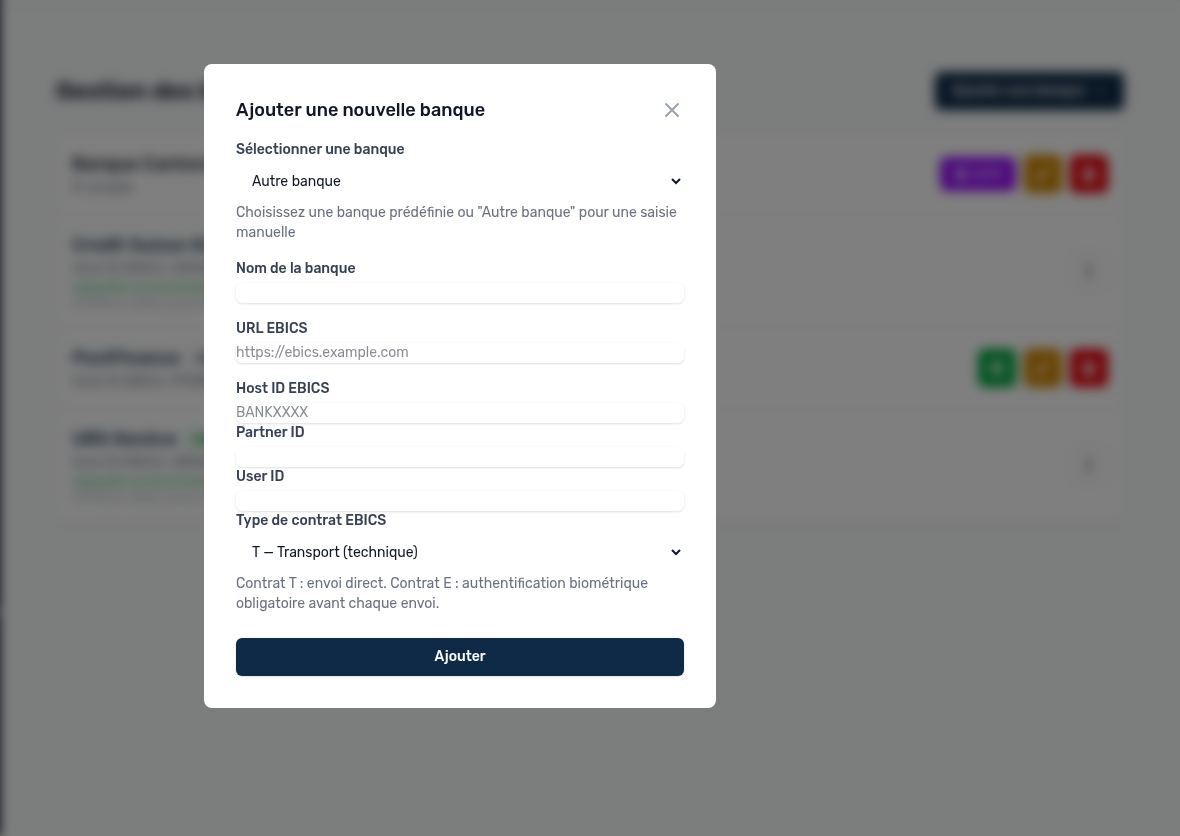
Window for adding an EBICS bank
| Field | Content | Where to find it |
|---|---|---|
| Select a bank | A predefined bank fills in the URL and Host ID automatically. "Other bank" lets you enter everything yourself. | — |
| Bank name | Name displayed in Arkaio (for example "UBS Genève"). | Your choice |
| EBICS URL | Address of the bank's EBICS server. | Contract or EBICS parameter sheet |
| EBICS Host ID | Identifier of the bank server. | EBICS contract |
| Partner ID | Customer (subscriber) identifier of your company at the bank. | EBICS contract |
| User ID | EBICS identifier of the technical user who initializes the connection. | EBICS contract |
| EBICS contract type | T — Transport: Arkaio transmits the file to the bank; the order must then be signed by the authorized signatories (VEU in Arkaio or e-banking) before it is executed. E — Individual signature: the submission counts as a bank signature; approval with a passkey (FIDO2) is required before each submission. | EBICS contract |
Tip — The contract type is checked with the bank (HTD information) after initialization: if the bank reports a different type from the one entered, Arkaio shows it and explains what to do (for example, register a passkey).
Updated on October 17, 2026
Can’t find your answer?
Our support team is here to help.
Contact support